Showing posts with label app. Show all posts

Monday, September 14, 2015

Sphero SPRK Edition, the Inspiring, Innovative, Incredible App-Enabled Ball {Review}

Sphero logo
I am an Orbotix Ambassador and this post is part of a sponsored campaign. I received compensation for my participation, but my review and opinions are my own.

Although it is a little bit of a blow to the ego, I have no doubt that both of my children will grow up to be far more technologically-skilled than I am. After all, right now I can still manage to muddle my way through using just about any device or application, but the way that they can both pick up gadgets or apps and instinctively know what to do will easily lead them far.

On top of that, when I grew up I had toys and games that were just that, toys and games. Kids these days? They have amazing, incredible, innovative things that are far more than just toys in that they are fun but also fully educational.

In fact, they are app-enabled robots that can change the way that children learn and play when they are the new Sphero SPRK Edition!

Sphero SPRK Edition

As the industry leader in Connected Play, Sphero (formerly known as Orbotix) is known for paving the future of fun. Unlike traditional toys, the robots and software they create provide ever-evolving experiences – changing the way people play, learn and explore by fusing emerging technology with the latest innovations in robotics.

After the success of Sphero 2.0, the original app-enabled robotic ball with a nearly-endless number of uses and abilities, Sphero has now launched Sphero SPRK (Schools, Parents, Robots, Kids) Edition and a corresponding SPRK app to even further change the way kids learn and play.

Together, Sphero SPRK Edition and the SPRK app are designed to inspire a love of robotics, coding, and STEM principles while teaching the power of cause, effect, and conditions in programming – all through play.

Consider that we don't know a whole lot about coding around here but are curious at heart, I was looking forward to seeing what my girls (and I) could do with the Sphero SPRK Edition.

Sphero SPRK box

Right out of the box Sphero makes it extremely easy to get started with their products. I simply removed the contents of the package (appreciating that there are multiple international plugs included for Sphero fans worldwide)...

Sphero SPRK Edition contents

...plugged in the charging base and set the SPRK right on top.

Sphero SPRK Edition charger

While the SPRK charged, it only took another minute to download the SPRK app (free in the App Store for iOS devices and Play Store for Android phones and tablets) and connect via Bluetooth.

Right away I was loving the fact that Sphero made the SPRK app accessible and appealing to all ages and abilities. For those of us who are beginners without any prior coding experience, the app allows an easy drag-and-drop method with visual blocks to control elements such as speed, color, spin and more.

Sphero SPRK coding

Being able to combine simple commands in an endless number of ways has had both of my girls excited to see the SPRK roll, flip, spin, change colors and more as it follows their instructions. Just move the visual blocks around, add new ones, delete others, make alterations, etc, and hit Run to see this cute little robot continue to roll!

Sphero SPRK Edition coding

At the same time, the SPRK app is sophisticated enough to challenge seasoned programmers. Tapping "Code View" instantly switches the visual coding blocks to OVAL, Sphero's proprietary C-based language, so that young innovators can use this as a foundation to learn more about programming.

Sphero SPRK Edition OVAL

As well as being able to see programs in both visual blocks and OVAL, the Sphero SPRK Edition features a transparent shell that allows users to see the immediate connection between what they created and how their robot ball works and reacts.

Sphero SPRK Edition review

But alongside the educational and technical side of SPRK, there is also a great deal of fun to be had.

This updated robot is compatible with all of the original Sphero games and apps, so discovering that we were able to switch it to "Drive" mode and use a virtual steering pad to zoom this ball around —up to 4.5mph— to play with (and only slightly terrorize) our cats has ensured that the laughter never ends!

Sphero with cats

At the end of the day, I have found myself completely impressed with Sphero SPRK Edition and am in awe of the way that it, coupled with the intelligent app, is so accessible to anyone and everyone on just about any terrain. Kids are able to use their imagination while being inspired, think deeper about what is possible when it comes to programming, and gain important future skills in a way that is not only approachable but also fun!

For tomorrow's inventors and innovators who would rather learn by doing than watching, SPRK Edition Sphero is available now at select retail partners, including Amazon for $129. The new SPRK app is free and is available in the App Store and from Google Play.

You can also keep up with all things Sphero by visiting Sphero.com and connecting with them on Facebook, Twitter, Instagram, Pinterest, YouTube, and Google+.

Thursday, August 13, 2015

Becoming a Master Woodchuck with the Numb Chucks: Chuck Fu {App}

Numb Chucks logo
I am a Numb Chucks Blogger Ambassador. This post is part of a sponsored campaign and I received compensation for my participation, but my review and opinions are honest and my own.

Although I encourage my children to play with games and toys that are educational and promote learning, I also know that there is nothing wrong with plain old fun sometimes. Who among us can't claim to enjoy being able to just kick back and partake in something mainly for the entertainment value?

Therefore, when I was introduced to two well-intentioned, but incompetent woodchuck brothers that have leapt from the television screen into a humorous new app, I had no doubt that my kids would have a great time laughing and giggling and having fun with the Numb Chucks: Chuck Fu app.

numb-chucks-chuck-fu-app

An animated series that originated in Canada, Numb Chucks is targeted at children ages 6-11 and features the woodchuck brothers Dillweed and Fungus. The series premiered in the U.S. earlier this year on Cartoon Network's Boomerang so now kids here coast to coast can cheer on these lovable woodchucks as they attempt to use Kung Fu to protect their hometown from criminals.

Numb Chucks Woodchuck MorrisEven though we have yet to catch the comedy on television, my kids have had no problem diving into Numb Chucks: Chuck Fu and playing the role of Dillweed and Fungus as they train to be like their hero, Woodchuck Morris!

This FREE app (available on iTunes and Google Play) includes eight of the steps in the "12-step Way of the Chuck training program" that will help players achieve the ultimate in Kung Fu (an expansion pack can be purchased for $2.99 for the additional four games). Players are even able to challenge their friends to see who gets the most points!

The more the levels are played, the more difficult and faster they become. Combine that with the way that Numb Chucks: Chuck Fu plays the games in a random order and your skills are continually tested to see if "missions" can be completed before time runs out.

Whether you are playing Grandma's Groceries and are challenged to swipe the groceries across the screen and into Grandma's grocery bag...

Numb Chucks Grandma's Groceries

...or are paying close attention during Baby Nom Nom to make sure that you cut up actual foods to turn into baby food and don't try to swipe things like bowling balls and pins...

Numb Chucks Baby Nom Nom

...or are testing your dexterity during Trim the Hedges to make sure that you stay within the path without touching the edges...

Numb Chucks Trim the Hedges

...it always feels good to complete the mission and get positive reinforcement from Woodchuck Morris himself!

Numb Chucks mini games

At the end of each mini game, players who have passed the mission are presented with a screen showing their score and an arrow to move on.

Those that did not pass their mission, however, are given the opportunity to use one of their "redo coins" that allow them to redo the same challenge.

Numb Chucks Chuck Fu

In all, this app is a lot of fun for kids to continue to be challenged to get higher scores and complete more missions. Both Big Sister E and Little Sister B have loved returning to Numb Chucks: Chuck Fu and continue to giggle and cheer as they move through the games.

Numb Chucks Chuck Fu app

To extend the fun even further, we have also downloaded the four additional mini games that are available to purchase within the app (players are also able to purchase more redo coins in packs ranging from 99¢ to $19.99). Adding in Chuck Fu Focus, Channel Chuck, Tree Chop Chop and Sixth Sensei has only extended the entertainment!

A word of warning, however. The more you play, the better you will become and you'll find yourself returning to visit your Chuck Fu training time and time again... I've found myself a little addicted to trying just one more time to complete another mission (and crossing my fingers that my favorite, Chuck Fu Balance, is the game that is randomly chosen next). I guess I'm just a kid at heart when it comes to Chuck Fu!

Chuck Fu Balance

Available now for free from the App Store and Google Play, Numb Chucks: Chuck Fu can be played anytime and is perfect for pulling out when waiting for appointments or to pass a short amount of time.

More information can be found by visiting the Numb Chucks Canadian website and connecting with them on Facebook, Twitter, Instagram, YouTube and Google+.

Thursday, June 11, 2015

Developing and Encouraging a Love of Reading with the Disney Story Central App {#DisneyStoryCentral}


Although I'm never overly happy seeing some of my traits imitated in my children (e.g. Big Sister E's lack of patience and Little Sister B's sneaky manipulation), I couldn't be more pleased that I've managed to pass on my love of books to them both.

Chapter books, picture books, digital books, non-fiction, fairy tales, Easy Reader books — no matter what the topic or type, they can both often be found paging through books of all kinds as they get themselves lost in the words and illustrations on the pages.

However, even though I will always have a soft spot in my heart for holding a physical book in my hand, it's hard to deny some of the benefits of creating a digital library. The instant access, the ability to carry it all with you on a single device, the knowledge that you're helping save a tree or two, and more.

Plus, most recently, we've been introduced to a way for kids to get even more excited about reading with their favorite characters anytime and anywhere thanks to Disney Story Central.

Disney Story Central

The largest collection of Disney digital stories, Disney Story Central features a wide array of Disney stories and characters that families know and love and is designed to encourage kids to develop a lifetime love of reading.

Whether you choose to utilize the subscription service (which gives kids unlimited access to Disney Story Central's expansive library of books for $7.99 a month) or the A La Carte option (which runs on a Disney Book Token system in which one token is worth one book download), kids are able to have a say in the books that they choose to read.

How could a child not be thrilled when they are the one empowered to make decisions about what characters they want to read about, what specific books they get to read, and what is included in their collection of stories?

As Disney Story Central is a cross-platform experience available via iPhone and iPad app, tablet-optimized website and Video on Demand (AT&T U-Verse), it didn't take long before we had the app downloaded and were browsing the expansive collection of Disney stories.

Disney Story Central homepage

Right away I appreciated the personalized book recommendations as a way to get started, while both of my kids were extremely excited to see the "Browse By Character" carousel. This lets them easily find books starring their favorite character from all of the Disney Franchises including Disney Princess, Disney Classics, Frozen, Doc McStuffins, Cars, and much more.

Disney characters

As well as seeing Little Sister B's favorite princesses and Frozen characters and Big Sister E's beloved Toy Story and Monsters Inc pals, they were thrilled to see that Disney Story Central even has options for new and upcoming franchises. They have been excitedly waiting for Inside Out to debut but can now already start getting to know these fun characters through books!

inside out books

I love that each genre offers a variety of content levels, so no matter if you have a pre-reader, speed reader or anyone in-between, they will easily be able to find and select the books that work best.

As a bonus, when your child has picked out the books that they would like to download, parents are able to first read a synopsis or preview the book to ensure that it is the correct level. While my kids would be happy reading books far too easy for them, I love that I can use this feature to make sure that we are in fact purchasing books that will challenge them just the right amount.

Monsters University book

Another great feature that Disney included is that children and adults have the option of reading the books themselves or having it read to them. Whether helping an emerging reader or simply to give Mom or Dad a break from reading nonstop, being able to choose what works for each situation is always best!

Disney Story Central books

From the customizable bookshelves for each member of the family (each with personalized reading recommendations) to the Stars, Ranks, and Trophies that reward kids for reading and encourage them to keep it up, Disney Story Central is a great way to promote reading all summer long and beyond. The entire library of Disney books are accessible right at kids' fingertips at home or on the go!

If you have young Disney fans who love to read or might need a little encouragement, Disney Story Central allows them to immerse themselves into the world of their favorite characters at the level just right for them. Add in the fact that utilizing the Disney Story Central app will allow you to bring your library with you throughout summer travel, while waiting for appointments, for rides in the car, and more, and it's a win-win!

Head over to the Disney Story Central website today to find out much more and explore how this app can promote reading in your home and then visit iTunes to download it and get started (free with in-app purchases).

Disney Story Central app

But, wait! Right now there is even one more reason to sign up, as today is the kickoff for Disney Story Central's 'Mid-Summer Light Reads' Campaign. Running through August 13th, this campaign promotes weekly summer reading themes featuring selected Disney titles and offers chances to unlock free books each week and gain entries into the Mid-Summer Light Reads Sweepstakes! Don't miss out!

I was selected for this opportunity as a member of Clever Girls and the content and opinions expressed here are all my own.

Friday, February 20, 2015

Disney Imagicademy Celebrates the Arts with Mickey's Magical Arts World App {#DisneyImagicademy}


I've always said that there is something magical about Disney. Nearly every one of their movies, theme parks, characters, books, television shows, toys and more have managed to capture the hearts of children and adults from all corners of the globe in a way that others just can't compare.

Therefore, last year when we were introduced to Disney's new learning brand, Disney Imagicademy, I had no doubts that it would be just the thing to merge my girls' love of the digital world with their passion to learn. What could be better?

Disney Imagicademy

Created as a way to inspire a natural love of learning and encourage kids ages 3-8 to learn by creating, making and doing, the emphasis of Disney Imagicademy is on how the creative experience fuels children's curiosity.

In fact, Disney Imagicademy is the first comprehensive brand of interactive and connected early learning experiences that combines the Disney characters and stories families love, with a research-driven curriculum developed in conjunction with top academics and education experts.

The integrated program includes 30-plus app-based experiences – five of which are available now as part of Mickey's Magical Math World – along with a companion app for parents, as well as books and other physical products that will be available for back-to-school 2015. The apps and products cover key subject matters that are important for early childhood development, including math, creative arts, science, reading and social and emotional skills.

With such a focus on imagination, endless possibilities and learning coming naturally, why would I not want to introduce my children to this world?

It was time to download Mickey's Magical Arts World!

Mickey's Magical Arts World

Compatible with most all iPads (2nd generation or higher, running iOS 7.0 or later), Mickey's Magical Arts World invites children to join Mickey and his friends in the most imaginative place around, as they explore a fully immersive world of creative arts.

Mickey's Magical Arts World app

Mickey's Magical Arts World is free in the App Store, however, it contains in-app purchases to unlock each of the five fun options for learning and play ($4.99/each or $19.99/bundle of all five).

Once we had purchased all of the various worlds of play, both Big Sister E and Little Sister B couldn't wait to get started creating!

Mickey's Magical Arts World free app

1. Mickey's Sketch Artist (Drawing)

Helping kids learn to draw and experiment with shapes, textures and lines with Mickey at the Drawing Studio, this engaging section allows users to practice their skills through free draw or with guided lessons.

From designing characters (that then become animated!) to coloring animals, flowers, objects and more, my kids have both had a great time with Mickey's Sketch Artist and I appreciate that it is open-ended and fun. There is no wrong way to use the crayons, spray cans, paintbrushes and more!

Mickey's Sketch Artist

2. Donald's Costume Play (Costume and Movies)

This portion of the app explores storytelling, improvisation, costume design, character development and role play with Donald... but not until kids prepare their character for movie stardom at Daisy's Hair and Wardrobe!

My girls have definitely enjoyed stretching their creativity while growing, brushing, tinting and styling hair, mixing and matching costumes, and more. Not to mention that their completed characters then appear in the short movie of their choosing and participate in all sorts of humorous antics!

Donald's Costume Play

3. Pluto's Crafty Creator (Materials)

This portion of the app lets kids design their very own virtual pets by transforming adorable animal toys into works of arts with different materials, tools, colors, textures and more. Start by selecting an animal and then dip, spin, scrub, paint, brush, sticker and more to turn it into your own one-of-a-kind toy!

What kid wouldn't have a blast getting to play with arts and crafts tools such as slime, cheese, glitter, stamps, crowns and more... while parents have the satisfaction of knowing that Goofy and Pluto will be the ones left with the (virtual) mess!

Pluto's Crafty Creator

4. Minnie's Art-chitect (Design)

This section was immediately a favorite of both girls, as they couldn't wait to get started designing six different types of buildings with Minnie.

But unlike games where the buildings are realistic and straightforward, this app has kids exploring things like proportion, balance, symmetry and hue all while stepping into the shoes of an architect. Little Sister B's eyes lit up time and and time again as she made her structures taller, shorter, wider, different colors, added windows, doors and so much more!

Minnie's Art-chitect

5. Mickey's Music Maker (Music)

No creative app would be complete without music! This final portion lets users explore and experiment with rhythm, patterns, pitch, tempo and melodies as they make music with Mickey and 13 different instruments.

After choosing which instruments will make up their band and the particular song that will be played, kids then lead the band on a parade, all the while controlling the speed and getting to record their masterpiece.

Mickey's Music Maker

Disney didn't leave parents out of the fun as well, as they also offer a coordinating app so that it is easy to monitor your child's progress on Mickey's Magical Arts World. Simply download the free Disney Imagicademy Parents app and you'll be able to be a part of the Disney Imagicademy community as well!

app-icon-imagicademyparents

Compatible with both the iPhone and iPad, this all-new app not only allows you to monitor your child's learning as they progress through all of the magical worlds with Mickey and friends, but it allows you to view your child's latest creations, provide in-game encouragement with a virtual "high five" and even share accomplishments with family and friends.

I love that I can log right in and see the "Pins" that my girls have earned, buildings and pets that they have designed and more. As opposed to other apps where I have a general idea as to what concepts are being presented, Disney Imagicademy Parents allows me to really stay on top of what is being learned.

At the same time, this app also serves as a fantastic go-to resource for information that can be used to engage with children in meaningful ways. In fact, Disney Imagicademy Parents let me easily find everything from daily articles to Imagicademy-inspired activities designed to help spark creativity and encourage imaginative learning. I can always use a little help when it comes to keeping my kids entertained and this app includes such a wide variety that you really can't go wrong!

Disney Imagicademy Parents

In addition to the digital apps, children and parents can engage with the Disney Imagicademy brand in a variety of ways, including a free community parent portal, free Disney Store events, books and magazines, and hands-on learning tools that extend the digital experience to the physical world.

The brand aims to engage and enrich children through the power of imagination and creativity and I'm looking forward to seeing what they come up with next!

Disney Imagicademy apps are available now for FREE in the App Store in the Kids, Education and Entertainment categories, so be sure to add Mickey's Magical Arts World and Disney Imagicademy Parents to your iPad today!

I was selected for this opportunity as a member of Clever Girls and the content and opinions expressed here are all my own.

Monday, January 19, 2015

Explore, Learn and Have Fun with Captain McFinn's Swim & Play App {#SwimAndPlay}

Swim & Play logo
I participated in an Influencer Activation on behalf of Influence Central for Captain McFinn. I received a complimentary subscription to facilitate my review as well as a promotional item to thank me for my participation.

There is no question that the popularity of smartphones and tablets has increased tremendously over the years and that kids younger and younger are becoming pros at tapping and swiping their way through apps, games, books and more.

However, simply because children have access to a screen doesn't mean that parents are going to put any sort of content or activities on it. Why have them spend time only being entertained when they could also be practicing important skills, challenging their minds, boosting their imagination, stimulating their creativity and more?

Instead, it makes sense that parents of preschoolers would give their children a head start on successful learning with apps that are engaging, unique, interactive and more. A perfect example? Captain McFinn's Swim & Play!

Captain McFinn app

Captain McFinn's Swim & Play is the first-ever children's app, aimed at kids ages 3-5, that
allows the users to truly interact and communicate back with a live host*, who can suggest activities, praise the child's accomplishments in the game, and even call players out by name.

Unlike traditional children's apps in which a child is simply tapping and swiping to follow static directions, Captain McFinn transforms the gaming experience by providing a guide to help extend the fun and learning. The result is not only an immersive experience, but the hosts also help to teach important pro-social proficiencies, like kindness and sharing, in a completely engaging way!

Even though both of my children are slightly old for a preschool level app, I had no doubt that they would have a great time swimming and exploring under the sea and couldn't wait to see their reaction to this innovative iPad app.

choose your fish

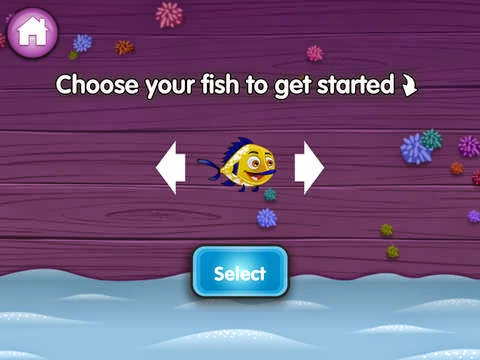
Right away both Big Sister E and Little Sister B liked that they were able to choose the color of their fish character (hopefully there will be more than three options for customization in the future) and had no problem typing in a nickname.

Kids are able to use just about any name — my girls got a kick out of using Swimmy quite often — which not only makes the game personalized but adds to the overall safety of having no personally identifiable information collected. At the same time, if the nickname space is left blank, then the app will pick a silly fun one for you!

Once your fish is selected and named, it's time to explore and play!

underwater princess

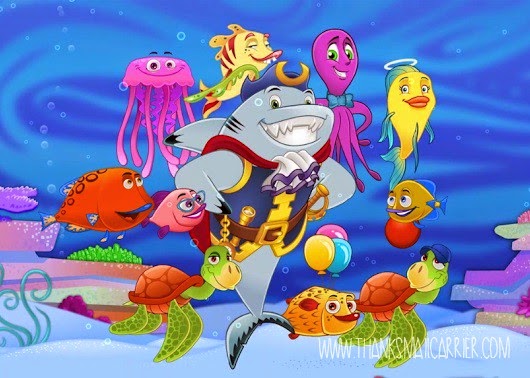
Based on the popular Captain McFinn storybook character who lives in the undersea world of Sand Dusty Reef with his friends, Captain McFinn's Swim & Play is a colorful place filled with friends, places and activities galore.

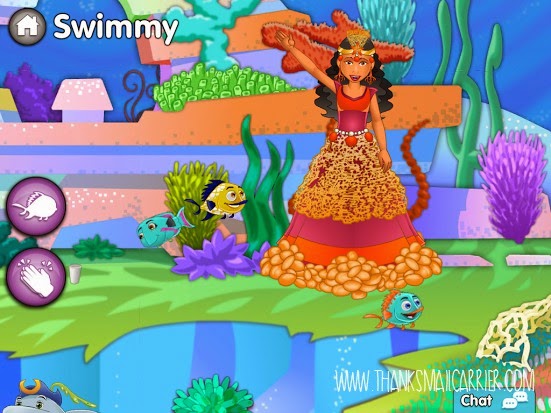
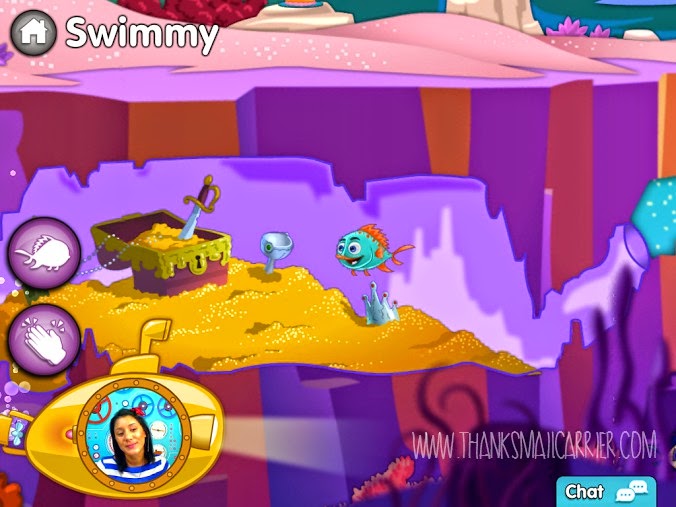
Explore up, down and all around as you discover shipwrecks, buried treasure, pop-up princesses, friendly characters that are always good for a laugh...

Captain McFinn's app

...and more.

But along with simply swimming around, children are able to perform a variety of tasks to perform. From recycling garbage and putting away toys to help keep the underwater environment clean to demonstrating good hygiene by brushing their teeth to brightening a friend's mood by building them a sand castle or giving them balloons, I love that this app encourages and rewards social responsibility and good deeds!

In fact, at any time a user can check the number of badges that they have received that show off exactly what a great job they are doing being a part of this underwater community.

Captain McFinn recycling
When a user finds items to recycle, they magically summon GEM to come zap them away!

But while Captain McFinn's Swim & Play would likely be a fun app with these features alone, the inclusion of the live Explorer guide really takes things to an entirely new level in terms of the experience as well as the social skills and lessons taught.

Just about every time we have opened this app (suggested times are between 7am-7pm PST), within a minute or two the gold submarine containing the Explorer appears and a new, extremely friendly host is there floating around. He or she happily chats, welcomes new players, points out great actions that have been completed, emphasizes positive messages, and much more.

The first time that Big Sister E and Little Sister B realized that the Explorer was truly referring to them, their jaws dropped! From that moment, they were instantly in love with playing along, listening to the instructions, participating in the group activities and more! The children even have the option of sharing creations that they make (e.g. songs, drawings and sand castles) and the Explorer just might show them off to the entire group of children that are playing!

As a parent, I was thrilled to see that all of the participants are encouraged to clap for creations that their fellow preschoolers created, a message that the Explorer hosts push strongly as well as subtly. I can't think of a single other app that manages to bring children together from all across the globe, yet keep them 100% safe while online.

interactive kids app

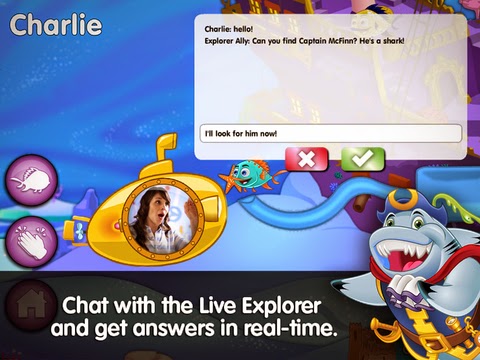
As an additional bonus to having a live Explorer guiding the children through the app, Captain McFinn's Swim & Play also includes a pop-up chat box that is accessed with a single click.

While this aspect can be used by children to say hello to the Explorers or share a friendly thought, I also found that it was convenient for parents in times of wanting to ask a direct question. For example, we had an instance when we suddenly could not hear the words the Explorer was saying, so I sent a message indicating such and she was able to quickly fix her microphone without causing a disruption to the game.

Captain McFinn chat box

All in all, Captain McFinn's Swim & Play really does allow children and their parents to touch content in a way never before done – and all in a secure setting alongside their friends. All of the topics and lessons have a positive message such as friendship, caring for others, helping others, etc, and the entire experience is different every time depending on the suggestions and direction of the Explorer guide.

The main aspect that we have had issues with is the way that, at times, the app moves from Sand Dusty Reef to short McFinn episodes and music videos that also promote messages about things like teamwork and believing in yourself. We have not yet found a way to exit the episodes to return back to exploring and my kids complain that they are "stuck" watching until they are over.

Instead, we would prefer to have the option of watching the videos or continuing to swim around underwater on our own. Similarly, users also cannot get to features like coloring and dress up on their own, instead having to wait for the Explorer to make them accessible. Hopefully there will be more options in future versions of this app!

Captain McFinn treasure

The Captain McFinn's Swim & Play app is available from the Apple iTunes Store using a subscription model. The freemium subscription model offers 10 minutes of free play at the start of the game, with subscription tiers of 1-month, 3-month and 6-month periods for $4.59, $3.59 and $2.59 per month, respectively.

If you are looking for a way for your preschool-aged child to get "tablet time" that is well-spent and different from other games, apps and shows, then I recommend you check out this one! Everything from the happy hosts to the catchy (but not annoying) music to the interactive learning, development, and encouragement of skills and values are items that all parents are sure to appreciate!

*The app complies with all COPPA (Children's Online Privacy Protection Act) safety standards, so although parents/children can see the host, the host cannot see them. Through proprietary technology, the host reacts to prompts, responses and creations by the child and texts from the parent (through a secure chat box) to make the interactive experience truly customized.

Friday, December 19, 2014

Joy Sprouts - Kids Preschool Education (Play, Learn, Develop, Report, Analyse, Guide) App

Joy Sprouts logo
There is no question that the popularity of smartphones and tablets has increased tremendously over the years and that kids younger and younger are becoming pros at tapping and swiping their way through apps, games, books and more.

However, simply because children have access to a screen doesn't mean that parents are going to put any sort of content or activities on it. Why have them spend time only being entertained when they could also be practicing important skills, challenging their minds, boosting their imagination, stimulating their creativity and more?

Instead, it makes sense that parents of preschoolers would give their children a head start on successful learning with Joy Sprouts — Kids Preschool Education (Play, Learn, Develop, Report, Analyse, Guide)!

Joy Sprouts app

Created by educational professionals, Joy Sprouts was designed for ages 2-6 to aid in developing a range of important skills in a child's total development. In fact, this free app was based on the U.S. Dept. of Health & Human Services' Head Start Framework, so there is no doubt that learning was an important factor in its creation.

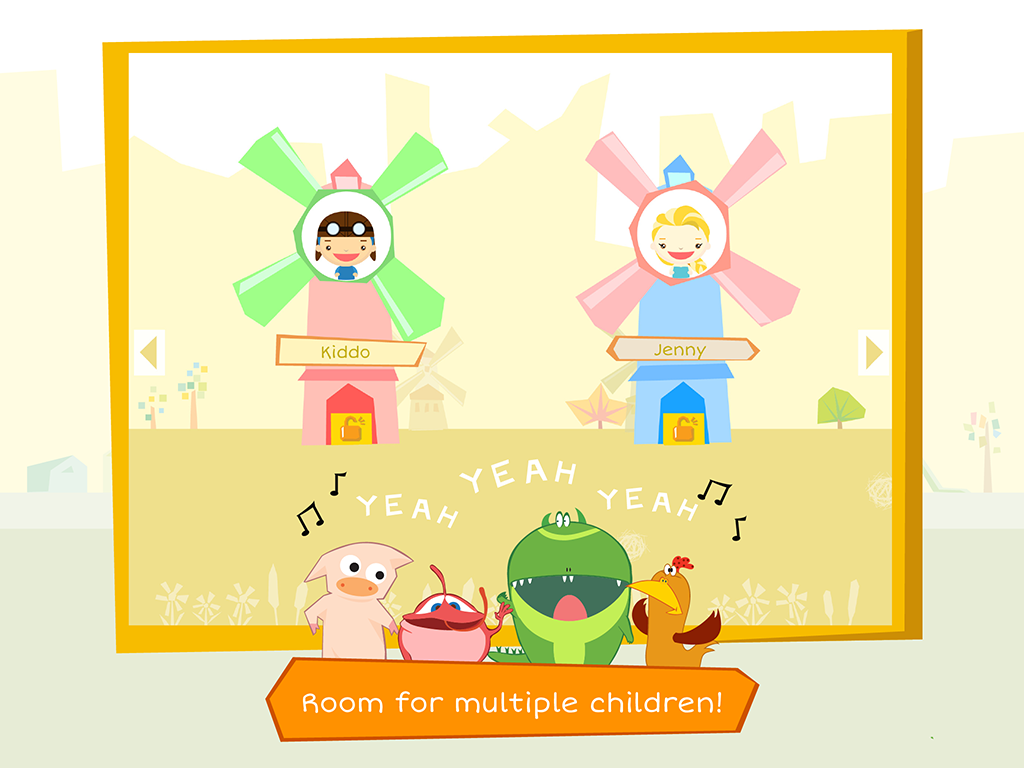
Utilizing colorful, cheerful illustrations, a helpful, calming narrative, and an intuitive user interface, it only takes a few minutes to set up a small profile for each child using this app (I love that multiple children can have their own profiles!) and rest assured that they will be happily entertained while still learning important skills.

Joy Sprouts app multiple children

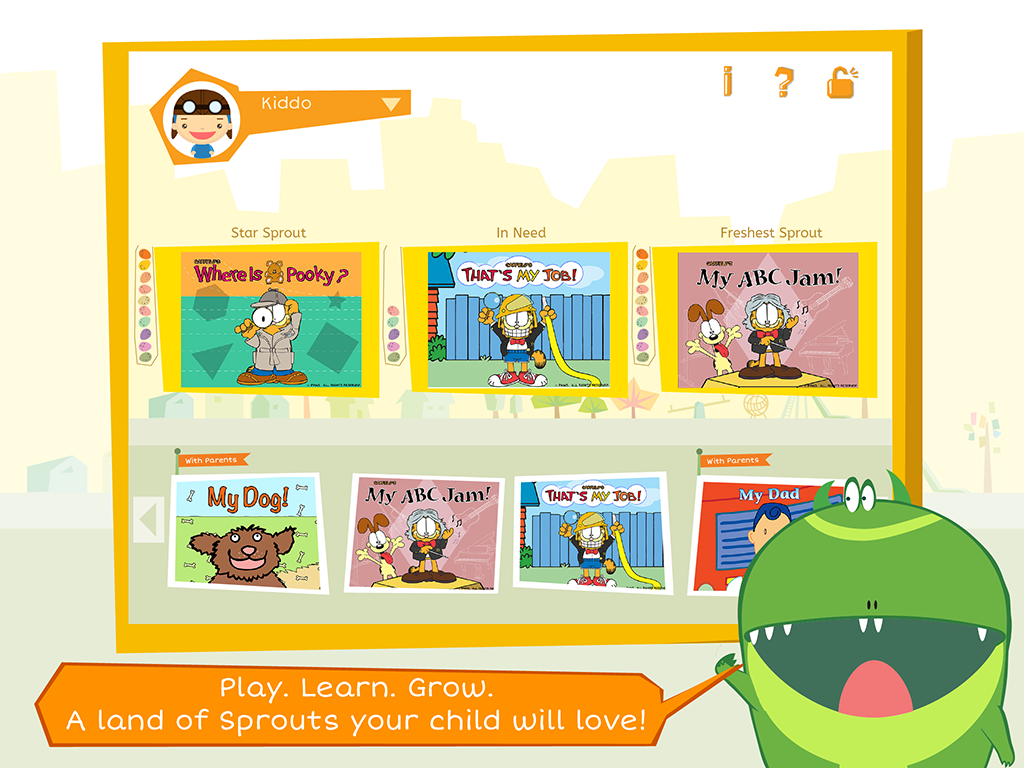
Once your child opens up Joy Sprouts, they are easily able to move through the award-winning games and activities. I appreciate that right off the bat the app is clearly divided into different modules — called Sprouts — made to help your child reach their full potential in five key areas:
  • Cognition and General Knowledge (Math, Science, and Social studies)
  • Language and Literacy
  • Learning Approaches
  • Social and Emotional Development
  • Physical Development and Health
JoySproutsApp1

From there, let the fun (and learning) begin!

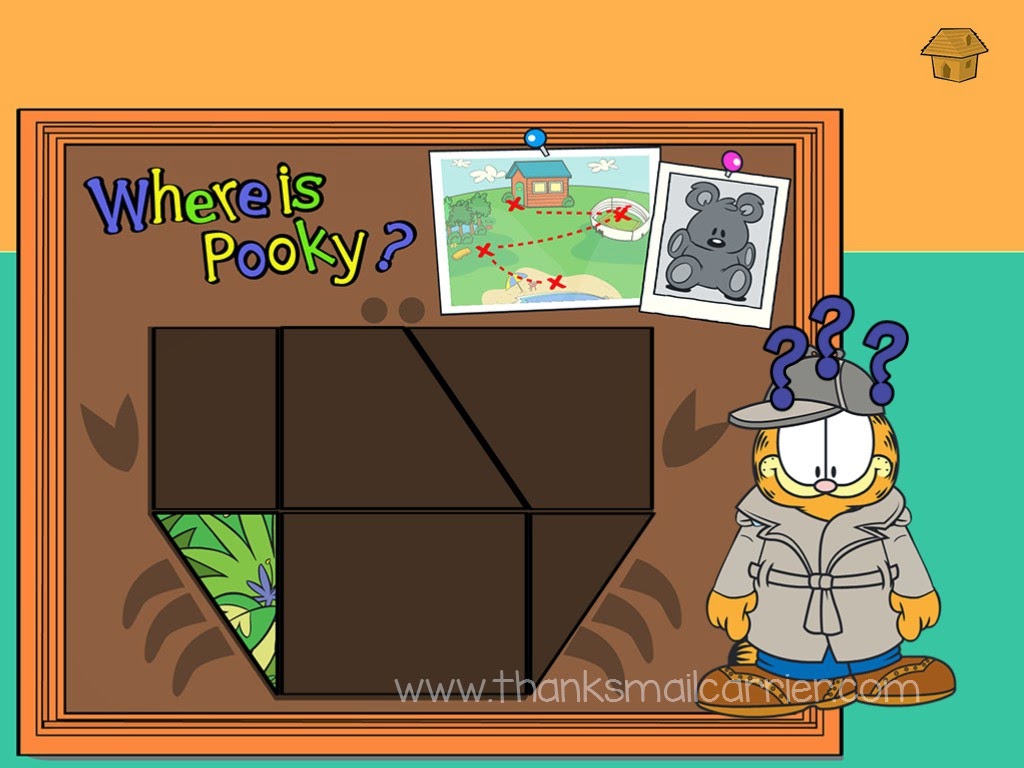
As each of the Sprouts features friendly characters (my nostalgic side loves seeing Garfield and Odie in most of them!) and is narrated with simple to understand instructions, kids have no problem creating patterns, identifying colors or shapes, putting together puzzles, using logic and more.

Joy Sprouts Garfield puzzle

Even though both Big Sister E and Little Sister B are a bit too old for Joy Sprouts, they have really enjoyed testing it out, pointing out all of the fun ways to play, and collecting awards for completing various games and activities!

Joy Sprouts app review

All in all, I really like the way that instead of focusing on a specific subject such as numbers, letters, colors or shapes, Joy Sprouts uses a total development strategy that strives to help children grow in all areas of education.

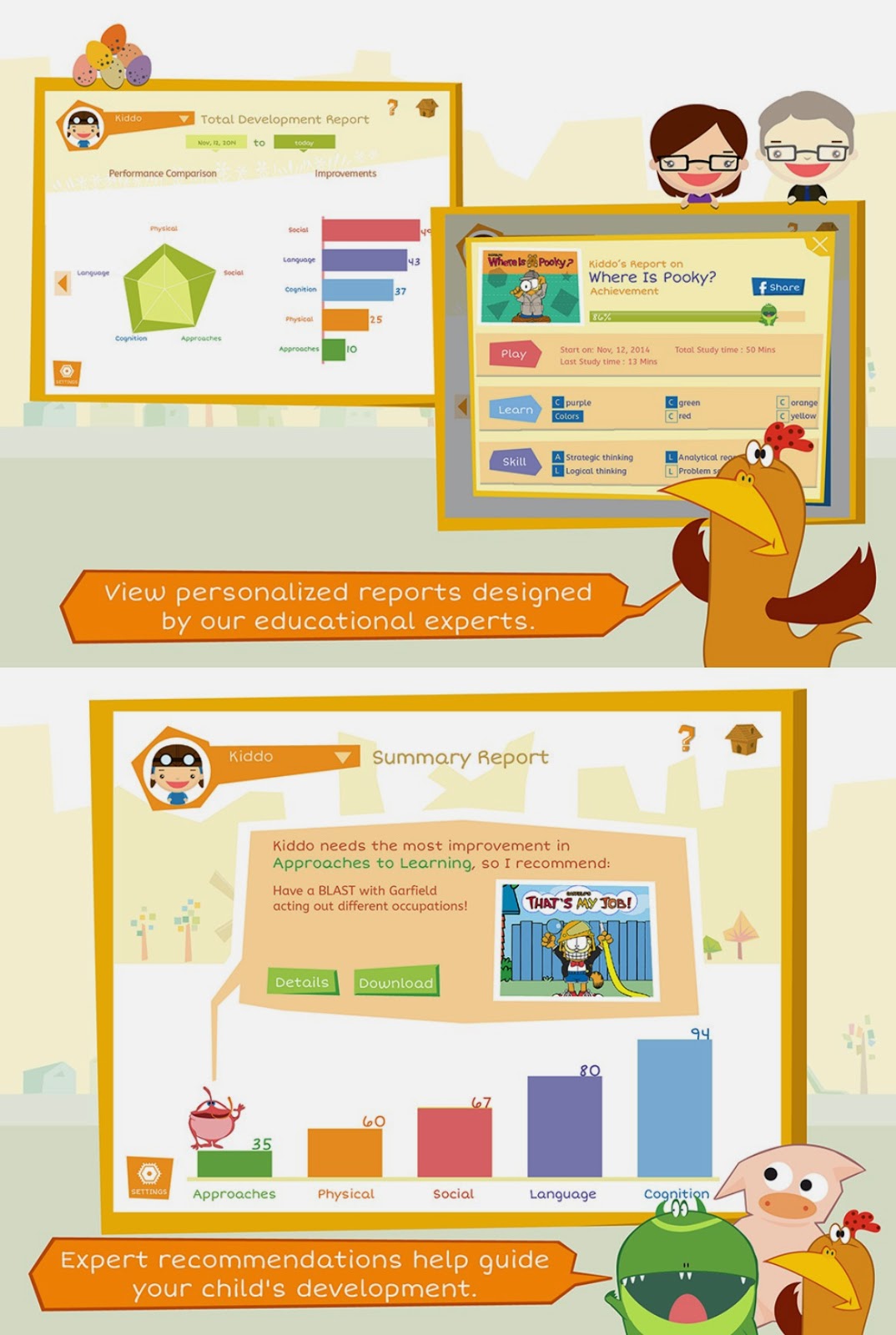
Plus, this app provides personalized summary reports that allow parents to follow their child's progress across the key areas of development. And not only do these reports detail progress, but they focus on the child's strengths and weaknesses as well — and offer recommendations from experts on which areas need more work to help the child reach their full potential.

free kids educational app

By combining expert educational content with entertaining, age-appropriate animations and characters, Joy Sprouts - Kids Preschool Education (Play, Learn, Develop, Report, Analyse, Guide) is an app that parents of preschoolers everywhere can appreciate. Why not encourage your child's total development while they simply think that they are playing and having fun?

Find out more and download this FREE app (compatible with iPads running iOS 7.0 or later) by visiting iTunes today.

I was compensated for my time in writing this review, however, all thoughts and opinions shared are honest and my own.